
- Standard
- Natural
- Voice Focus · Plus & Creator
Features
Every Feature, Built Around Your Game.
Recording, audio, clip management and cloud storage — here is everything Girok does today, in detail.
Recording
Record any game, your way.
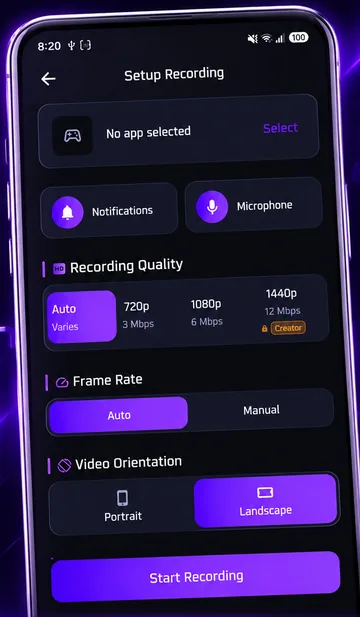
Pick an installed app or record your entire screen, then choose quality, frame rate and orientation on one setup screen.
| Preset | Frame rate | Bitrate | Approx. size | Plan |
|---|---|---|---|---|
| 720p | 30 fps | 3 Mbps | 24 MB/min | Free |
| 1080p | 60 fps | 6 Mbps | 46 MB/min | Plus |
| 1440p | 60 fps | 12 Mbps | 91 MB/min | Creator |
Auto picks the best quality your device and plan allow. Girok never records above your screen's resolution — 1440p needs a 1440p-capable display.
Installed apps or Entire Screen
Search your installed games, or record everything on your display. On Android 14 and newer, Android can also let you share a single app.
Frame rate: Auto or Manual
Let Girok decide, or set 30, 60, 90 or 120 fps yourself. Rates your device can't record are greyed out.
Portrait or Landscape
Tall video for portrait games, wide video for landscape games. Picking a game suggests the right orientation.
3-2-1 countdown
A short countdown before capture gives you time to switch to your game.
Save & Stop from the notification
Stop recording from the notification shade without leaving your game.
Storage safeguards
Girok warns you when storage is low and won't start a recording with less than 100 MB free.
Audio
Game sound and your voice, in one clip.
Girok records the sound of your game and your microphone together, mixed into the same video.
- Separate volume sliders — set game sound and microphone from 0 to 100% in steps of 10, with one-tap reset to the recommended levels.
- Mic modes — Standard on the phone's own microphone; Natural is used automatically with earphones.
- Noise Cancellation — Voice Focus reduces fans, TV and other steady background noise on Plus and Creator, on supported devices.
- Mic on or off per recording — switch your voice off for any recording and keep the game sound.
Android uses the microphone permission for all recorded sound, including game audio. Some games don't allow other apps to record their sound.
My Clips
Every recording, organised.
Recordings are saved to your phone in Movies › Girok and appear in My Clips, ready to watch and share.
Filter, search & sort
Filter by Device, Cloud or Exported, search by name, and sort by newest, oldest, longest or shortest.
Watch & rename
Play clips in the built-in player and give them names you'll recognise.
Share anywhere
Send a clip to your favourite apps straight from its details.
Select many at once
Multi-select clips to upload or delete them together.
Upload or download
Back a clip up to Girok Cloud, or save a cloud clip back to your device.
Short clips protected
Recordings under 3 seconds aren't saved automatically — Girok asks whether to keep or discard them.
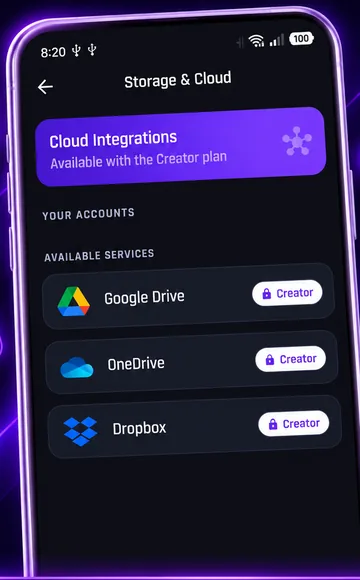
Google Drive export is available on Creator today. OneDrive and Dropbox are not yet available.
Cloud & Export
Back up, free up, export.
Girok Cloud keeps a private backup of the clips you choose. Nothing leaves your phone unless you upload it or turn on auto-upload.
Free2 GBCloud storage
Plus20 GBCloud storage
Creator50 GBCloud storage
- Auto-upload — Wi-Fi only, or Wi-Fi and mobile data. Manual upload is always available.
- Free up space — remove the phone copy and keep the cloud backup.
- Storage add-ons — add 50, 100 or 250 GB with a monthly add-on.
- Export to Google Drive — on Creator, connect one Google account and choose the export folder name.
Plans
Start Free. Upgrade When You're Ready.
Plus and Creator are billed monthly or annually through Google Play, and you can cancel anytime in Google Play. Prices are shown in the app.
| Feature | Free | Plus | Creator |
|---|---|---|---|
| Recording quality | Up to 720p · 30 fps | Up to 1080p · 60 fps | Up to 1440p · 60 fps |
| Game sound + microphone | Included | Included | Included |
| Noise Cancellation (Voice Focus) | — | Included | Included |
| Girok Cloud storage | 2 GB | 20 GB | 50 GB |
| Auto-upload & manual upload | Included | Included | Included |
| Export to Google Drive | — | — | Included |
Quality depends on your device: Girok never records above your screen's resolution. Noise Cancellation needs a device with a supported noise suppressor.
Ready to Capture Your Next Great Moment?
Download Girok and start capturing the gaming moments worth remembering.